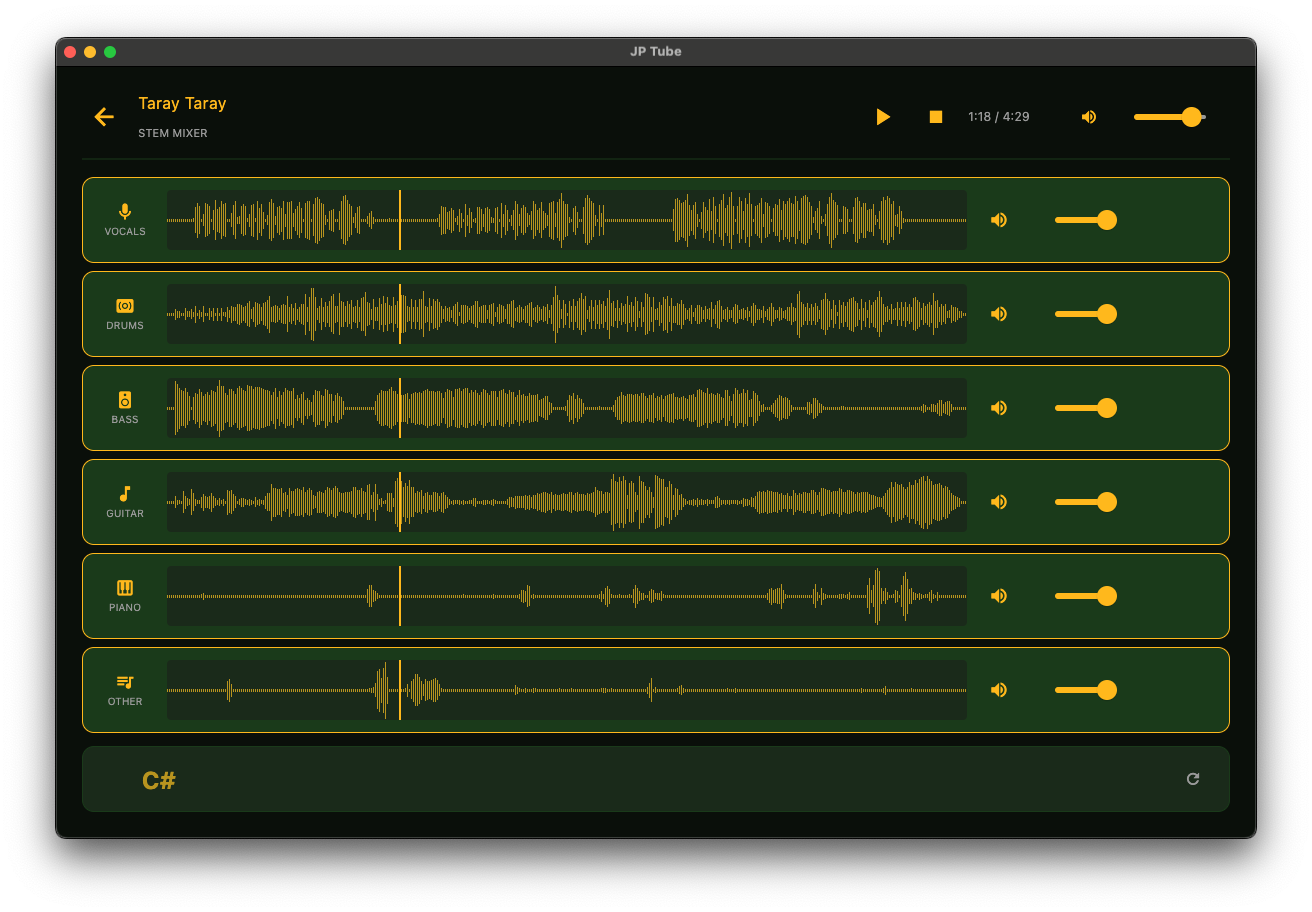
JP Tube: A Desktop Music Downloader, Stem Splitter, and Karaoke Player
From zero to a production-ready macOS desktop app — a case study in audio engineering, PyInstaller warfare, and the art of instant seeking.
What Is JP Tube?
JP Tube is a desktop application that downloads YouTube audio as MP3, separates it into instrument stems (vocals, drums, bass, guitar, piano, other), detects chords, and displays real-time karaoke lyrics — all wrapped in a Jurassic Park-inspired dark jungle UI.
Why I build this?
I usually use guitar backing track to practice and play guitar for many years. I have used Moises app (free version) for last 2 years to separate track and play guitar with it. Since I am a full-stack developer, I decided to build my own software with AI and avoid any subscription for Moises app.
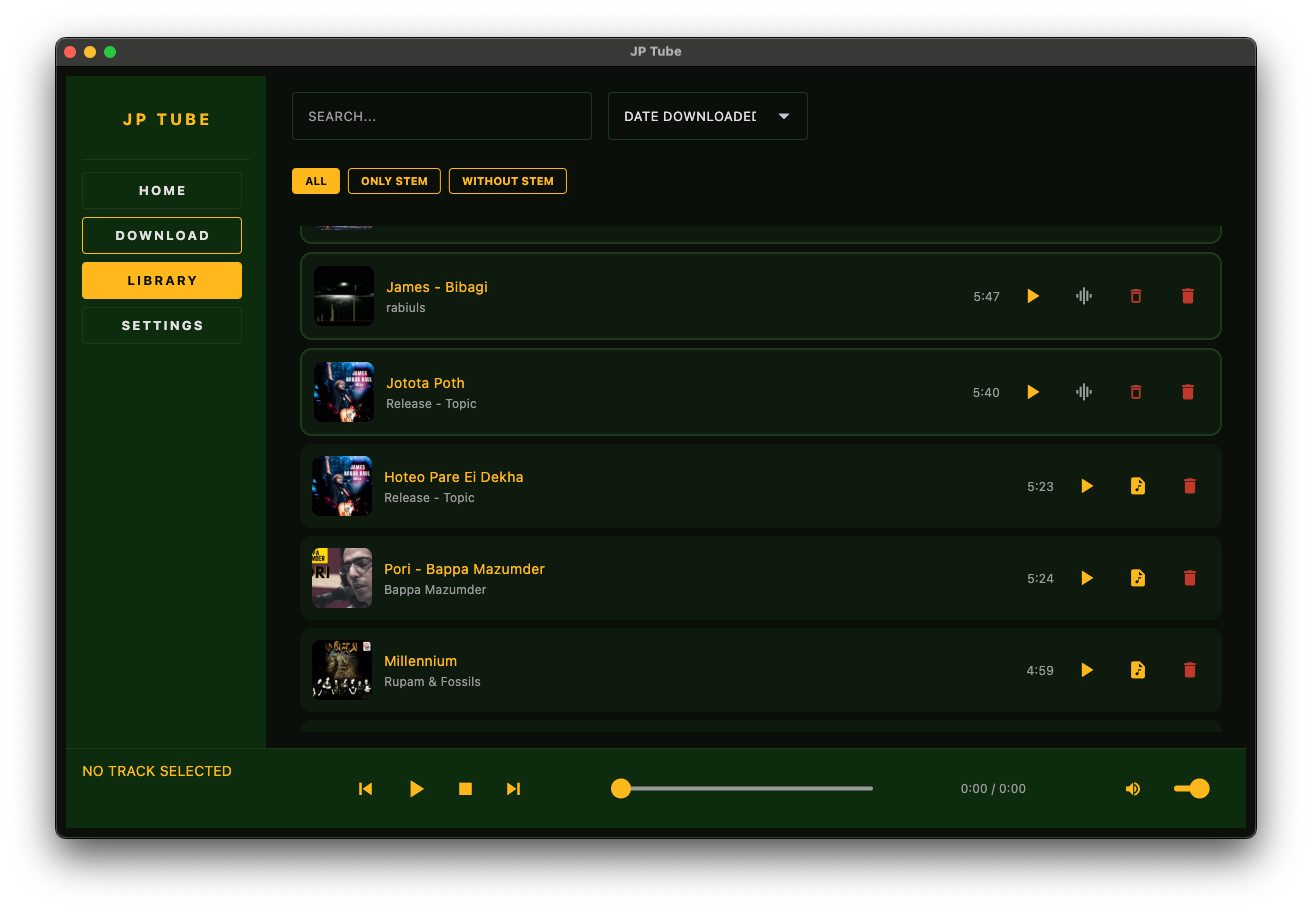
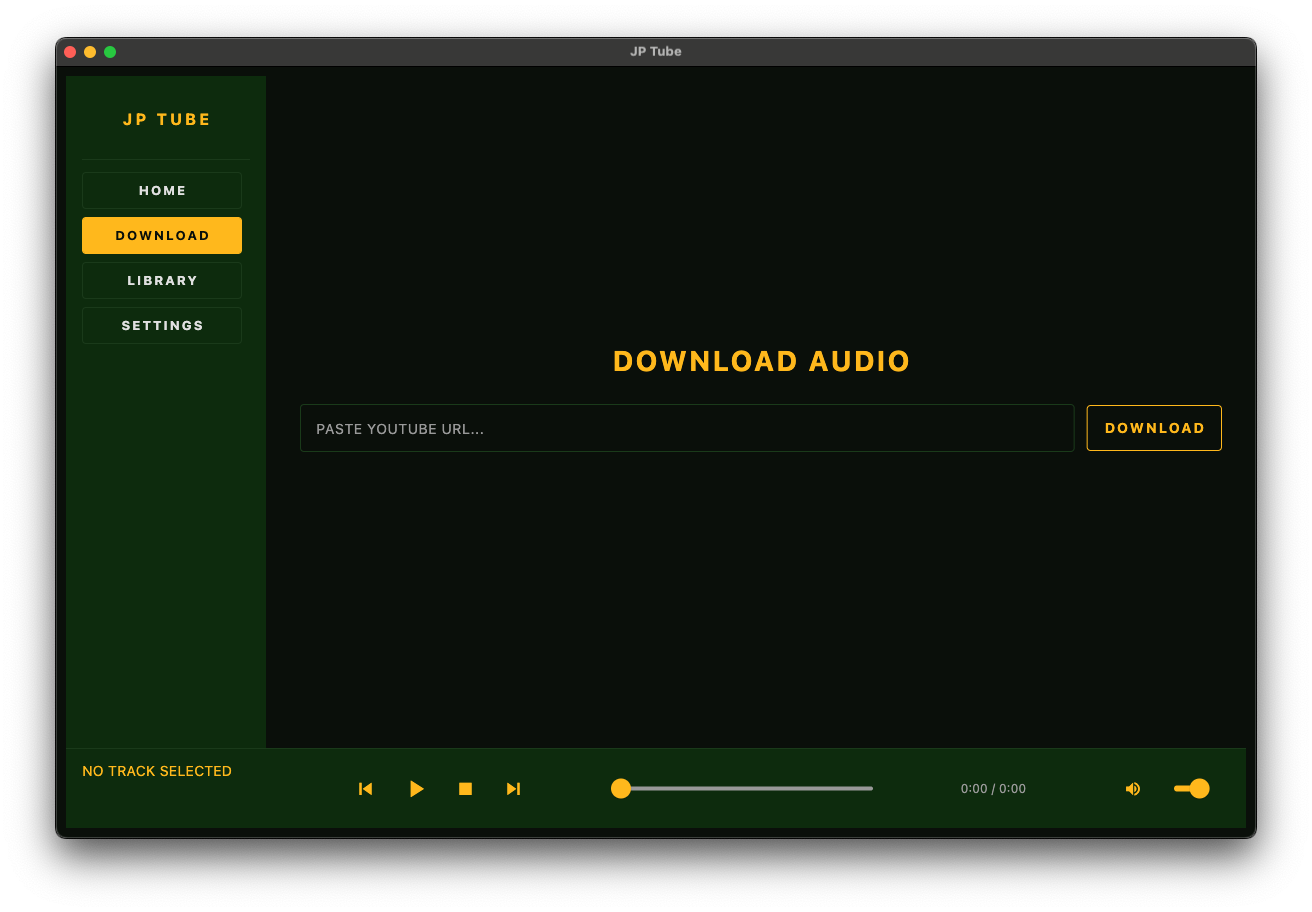
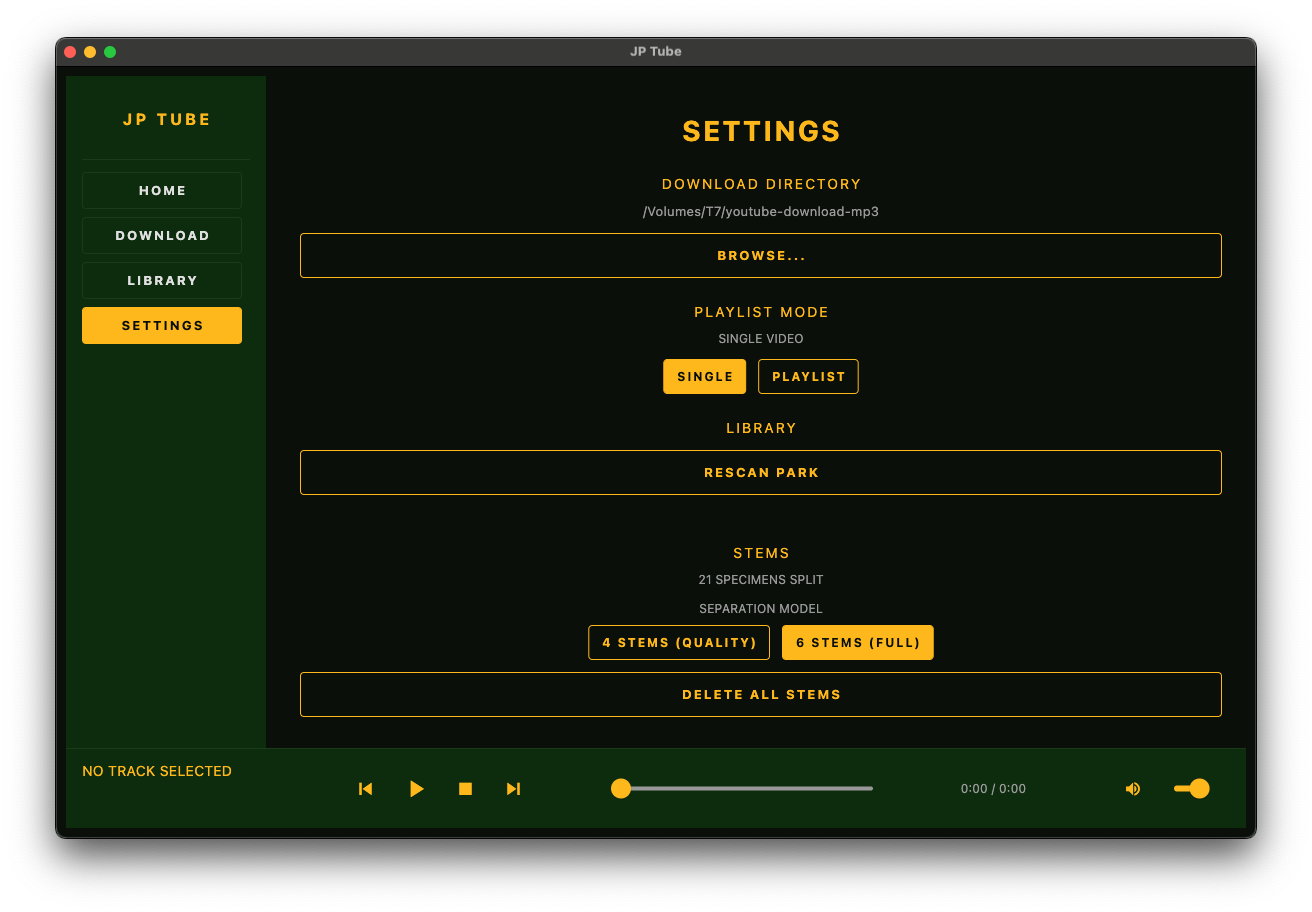
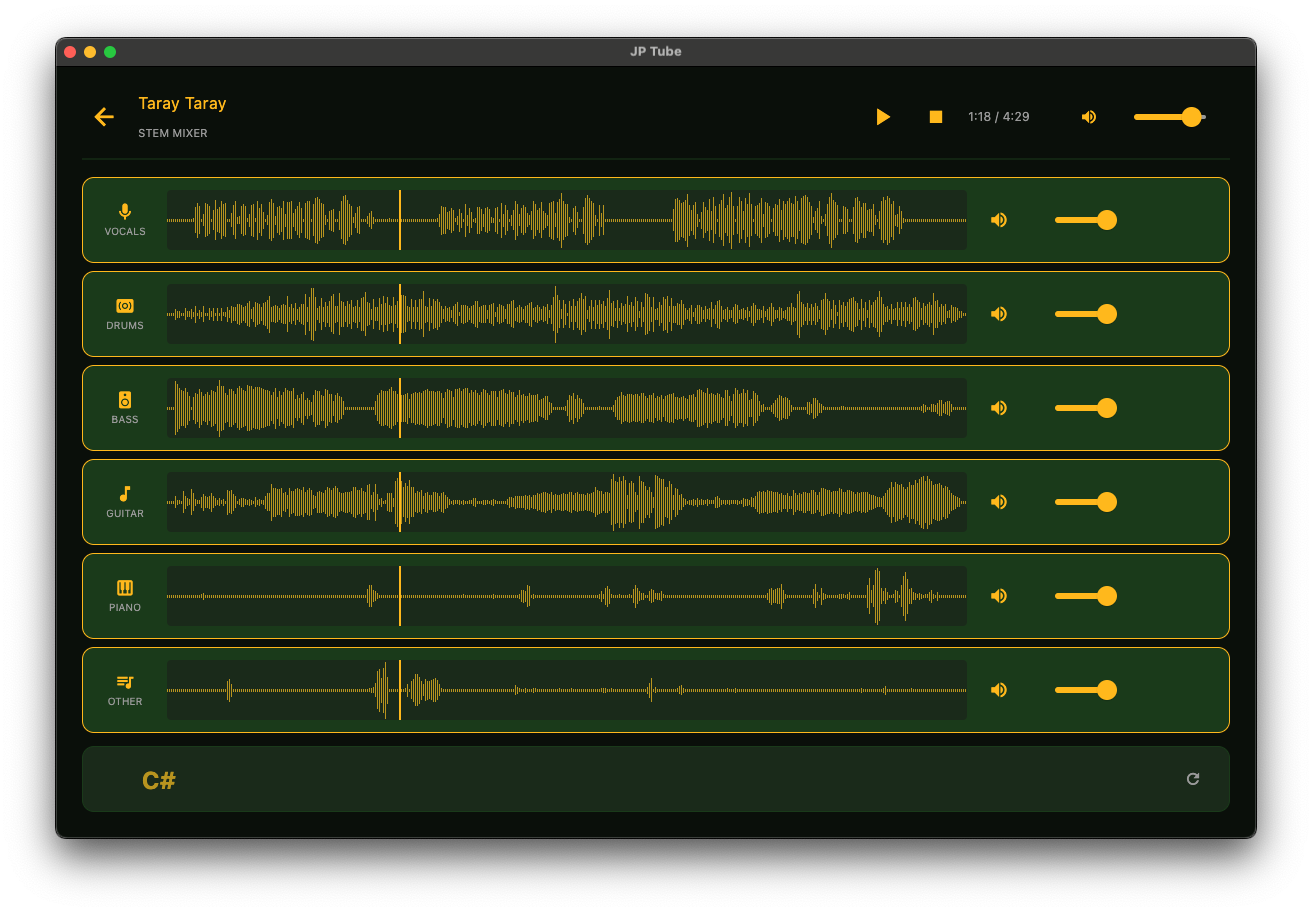
Screen shots
The Stack
| Role | Technology |
|---|---|
| Package Manager | uv (Python 3.11.11) |
| GUI Framework | flet 0.85.1 |
| Downloader | yt-dlp + ffmpeg-downloader |
| Audio Playback | sounddevice>=0.5.1 + custom AudioEngine |
| Stem Separation | audio-separator[cpu]>=0.44.0 (Demucs) |
| Lyrics (Fast) | yt-dlp caption extraction |
| Lyrics (Fallback) | faster-whisper>=1.1.0 (base, int8, CPU) |
| Chord Detection | librosa==0.10.2 (chroma_cqt + template matching) |
| Waveforms | numpy + PIL |
| Database | SQLite (stdlib sqlite3) |
| Build | PyInstaller via flet pack + custom hooks |
| Agentic coding. | Opencode |
| Model | Kimi K 2.6 |
Architecture & Data Flow
src/
├── main.py                    # Entrypoint, layout assembly, window close handler
├── design.py                  # Design system constants
├── database.py                # SQLite init + CRUD
├── downloader.py              # yt-dlp wrapper (threaded, progress hooks)
├── audio_engine.py            # sounddevice-based audio engine
├── stem_splitter.py           # audio-separator wrapper
├── waveform_generator.py      # Histogram-style waveform PNGs
├── chord_generator.py         # librosa chroma chord detection
├── lyrics_generator.py        # faster-whisper transcription
├── youtube_caption_fetcher.py # YouTube caption extraction
├── lyrics_chords_merger.py    # Time-based merge for display
├── ffmpeg_manager.py          # ffmpeg detection and auto-download
├── thumbnail.py               # Thumbnail download
├── rescanner.py               # Disk rescan for orphaned MP3s
└── components/
    ├── sidebar.py
    ├── download_view.py
    ├── library_view.py
    ├── player_bar.py
    ├── stem_player_view.py
    ├── settings_view.py
    ├── confirm_dialog.py
    └── scanline_overlay.py
App Flow
User pastes URL
    ↓
downloader.py (thread) → yt-dlp → MP3 + thumbnail
    ↓
database.py → SQLite row
    ↓
library_view.py → row rendered with thumbnail
    ↓
User clicks "Split"
    ↓
stem_splitter.py (thread) → Demucs → WAV stems + waveform PNGs
    ↓
database.py → stems table
    ↓
stem_player_view.py → multi-track mixer
    ↓
User clicks "Generate Lyrics & Chords"
    ↓
youtube_caption_fetcher.py (seconds) OR lyrics_generator.py (minutes)
    ↓
lyrics_chords_merger.py → karaoke bar overlay
Showcase: What We Built
| Feature | Demo |
|---|---|
| Download | Paste YouTube URL → 192 kbps MP3 in ~10 seconds |
| Library | Search, sort, filter by stem status, visual differentiation |
| Playback | Play/pause/seek/volume with instant scrubbing |
| Stem Split | 4 or 6 stems with real-time progress bar |
| Stem Mixer | Per-stem volume + toggle, click-to-seek on waveforms |
| Lyrics | YouTube captions (2s) or Whisper (30s), auto-fade during instrumentals |
| Chords | Real-time chord display and lyrics, click to seek |
| Bundle | Standalone .app on macOS, no Python install required |
The Numbers:
- ~6,500 lines of Python
- 14 source modules + 9 UI components
- 3 AI models (Demucs, Whisper base, chord templates)
- ~500MB of cached model weights
- 0 external runtime dependencies (all bundled)
Total AI cost
~ $40
Time required
~ 40 hours
Key Features: The Technical Deep Dives
The Audio Engine: Why We Ditched pygame for sounddevice
The Problem:
Our first implementation used pygame.mixer. It worked — until it didn't. Seeking to a new position in a 4-minute song took 2-3 seconds on a low-end Mac. For a music player, this is unacceptable. Worse, pygame.mixer.music is a singleton; you cannot play multiple tracks simultaneously for stem mixing.
The Solution:
We built a custom AudioEngine on top of sounddevice (a Python wrapper around PortAudio). Here's how it works:
class AudioEngine:
    def __init__(self):
        self.stream = sd.OutputStream(
            samplerate=44100,
            channels=2,
            dtype='float32',
            callback=self._callback
        )
        self.frame_position = 0
        self.tracks = []  # List of numpy float32 arrays

    def _callback(self, outdata, frames, time_info, status):
        for i in range(frames):
            if self.frame_position < len(self.mix_buffer):
                outdata[i] = self.mix_buffer[self.frame_position]
                self.frame_position += 1
            else:
                outdata[i] = 0.0

    def seek(self, seconds):
        self.frame_position = int(seconds * 44100)  # Instant.
Why This Matters:
- Instant Seek: Seeking is an integer assignment. No re-encoding. No buffer rebuilds. Zero latency.
- Unified Engine: The same
OutputStreamcallback handles both single-track playback and multi-stem mixing. We just change what's in thetrackslist. - Toggle Without Stopping: Muting a stem means multiplying its contribution by
0in the callback. No audio artifacts. No stop/start.
Stem Mixing: For stem playback, we load all WAV stems as numpy arrays. The callback mixes them in real time:
sample = sum(
    track[self.frame_position] * stem_volume[i] * master_volume
    for i, track in enumerate(self.tracks)
    if stem_enabled[i]
)
Trade-off: We had to implement our own pause/resume logic (stop the stream, save the frame position, restart at that position). But the payoff in seek performance and mixing flexibility was enormous.
Stem Separation: Wrangling Demucs
We use audio-separator (which wraps Facebook's Demucs model) to split MP3s into stems. The implementation is deceptively simple on the surface:
from audio_separator.separator import Separator

separator = Separator(
    model_file_dir="models/",
    output_dir=stems_dir
)
output_files = separator.separate(audio_file)
The Devil in the Details:
- Model Selection: We support two models:The user toggles this in Settings. The choice is persisted to SQLite.
htdemucs_ft.yaml(4-stem: vocals, drums, bass, other) — higher quality, defaulthtdemucs_6s.yaml(6-stem: vocals, drums, bass, guitar, piano, other) — full separation
- Progress Reporting: Demucs does not expose a progress callback. We monkey-patch
demucs.apply_modelto inject aset_progress_barhook that reads the internal state and reports percentage to the UI. - Sample Rate Preservation: We detect the original MP3's sample rate and pass it to
audio-separator. Without this, resampling drift causes stems to be slightly different lengths, breaking sample-accurate sync. - Normalization: We set
normalization_threshold=1.0to preserve the original mix balance. Aggressive normalization can make stems sound unnatural. - Waveform Generation: After splitting, we generate 400-bar histogram-style waveform PNGs from the raw audio arrays. These are displayed as mini waveforms in the stem mixer, with a playhead overlay.
Lyrics at the Speed of YouTube
The Insight:
Most YouTube videos already have captions. Why spend 30 seconds running AI transcription when you can fetch existing captions in 2-5 seconds?
Implementation:
# src/youtube_caption_fetcher.py
def fetch_captions(video_id: str) -> Optional[List[dict]]:
    # Use yt-dlp to list available caption tracks
    # Prefer: manual captions in original language → English manual → auto captions
    # Reject: captions with >80% music markers (♪, [Music])
    # Convert to our lyrics.json format with line-level timestamps
The Two-Tier System:
- Fast Path (YouTube Captions): ~2-5 seconds. Line-level timestamps only. No per-word data.
- Slow Path (Whisper): ~15-30 seconds. Word-level timestamps. Higher accuracy for singing.
The UX Problem:
YouTube captions provide line-level timestamps: "Hello darkness, my old friend" spans 0.0s → 6.0s. We don't know when individual words start. Our first instinct was to evenly split the duration across words. It looked terrible — jerky, artificial, obviously wrong.
The Decision: We intentionally do NOT estimate fake word-level timestamps from YouTube line-level captions. If the user wants word highlighting, they wait for Whisper. The app shows the full line immediately and does not attempt to highlight individual words. This is a UX trade-off in favor of correctness over flashiness.
Hysteresis & Gap Tolerance:
YouTube captions often have overlapping or back-to-back timestamps with tiny gaps (0.1-0.3s) between lines — usually breath gaps. Without handling this, the karaoke bar would flicker off/on between every line. We added:
- Hysteresis: Once a line is shown, it persists until its actual
endtimestamp, even if the next line technically started 0.1s early. - Gap Tolerance: If the gap between lines is < 0.8s, we treat it as a breath gap and keep the bar visible.
Chord Detection with librosa
Chord detection runs on the harmonic stems (guitar + piano + other).
Algorithm:
- Mix harmonic stems into a single array
- Compute chromagram with
librosa.feature.chroma_cqt - For each time frame, compute cosine similarity against 36 chord templates (12 roots × major/minor/7th)
- Apply median filter (7-15 frames) for temporal smoothing
- Merge consecutive identical chords, discarding anything < 0.5s
The Data Model:
Chords and lyrics are never merged into text. They are independent event streams synchronized by timestamp:
// chords.json
{"segments": [{"start": 0.0, "end": 2.0, "chord": "C"}, ...]}

// lyrics.json
{"lines": [{"start": 0.0, "end": 6.0, "text": "Hello darkness...", "words": [...]}]}
At render time:
chord = find_segment(current_time, chords_data["segments"])
line = find_segment(current_time, lyrics_data["lines"])
word = find_segment(current_time, line["words"]) if line else None
This avoids ChordPro parsing, font metrics nightmares, and fragile text manipulation.
The PyInstaller macOS Bundle: A War Story
Shipping a Python desktop app on macOS is easy until you actually try it.
The Subprocess Re-execution Death Spiral:
PyInstaller's default onefile mode on macOS extracts the entire app to a temp directory on every launch. When any library (torch, numba, flet client) spawns a subprocess via subprocess.Popen([sys.executable]), the child process re-runs the entire GUI app instead of the intended Python code.
Result: Click "Split Stems" → 3 duplicate JP Tube windows open randomly. Close the app → it re-opens. It is genuinely horrifying.
The Fix — Three-Layer Defense:
- OneDir Mode: We patched
flet packto use--onediron macOS (it blocks it by default). This places Python libraries as actual files inside the.appbundle instead of extracting on every subprocess spawn. - Subprocess Guard Runtime Hook: We inject a runtime hook that patches
subprocess.Popenandos.spawn*at the CPython level. Baresys.executablecalls (no-c,-m, or.pyarguments) are redirected tosys.executable -c "import sys; sys.exit(0)", making child processes exit immediately instead of re-launching the GUI. - Single-Instance Guard: Before starting the flet app, we acquire an exclusive file lock with
fcntl.flock(LOCK_EX | LOCK_NB). If another instance is running, the new process exits cleanly. multiprocessing.set_start_method('spawn'): Ensuresmultiprocessingon macOS uses the safespawnmethod instead offork, preventing fork-related crashes in the bundle.
The Runtime Patches:
Inside the PyInstaller bundle, we apply several monkeypatches that are harmless when running from source:
librosa.load→soundfile.read(bypasses ffmpeg/audioread dependency)librosa.get_duration→sf.infoaudio_separator.prepare_mix→soundfile.readwrite_audio_soundfile→ forcesPCM_16subtype for WAV output (MP3 input subtypeMPEG_LAYER_IIIis invalid for WAV)faster_whisper.utils.get_assets_path→ redirects VAD model lookup tosys._MEIPASS/faster_whisper/assets/
Build Command:
uv run python build_macos.py
# Patches flet pack for --onedir, runs PyInstaller with all hooks
xattr -dr com.apple.quarantine "dist/pack/JP Tube.app"
cp -R "dist/pack/JP Tube.app" /Applications/
Design System: Jurassic Park Aesthetic
The entire UI follows a cohesive "Jurassic Park Dinosaur Explorer" design system:
| Token | Value | Usage |
|---|---|---|
JP_DARK |
#0a0f0a |
Page background |
JP_GREEN |
#1a3a1a |
Secondary backgrounds, borders |
JP_JUNGLE |
#0d2b0d |
Sidebar depth |
JP_YELLOW |
#FFB81C |
Primary accent, buttons, active states |
JP_RED |
#c0392b |
Danger actions |
TEXT_BODY |
#e0e0e0 |
Default text |
BAR_BG |
#1a2a1a |
Progress bars, waveform backgrounds |
- Typography:
Orbitronfor headings (retro-futuristic),Roboto Monofor body text (terminal aesthetic) - Scanline Overlay: Full-screen CRT effect with 1px black lines at 15% opacity
- Particle Animation: 40 floating yellow particles with random drift
- Stat Bars: 4px yellow bars with animated fills (used for download progress, stem splitting progress)
Every component — from the sidebar navigation to the stem mixer rows — adheres to this system. The result feels like a piece of software from an alternate timeline where Jurassic Park had a music lab.
Decisions, Trade-offs, and Why
1. Flet over Electron/Tauri
Why: Python ecosystem access. We needed yt-dlp, librosa, torch, and faster-whisper. Re-implementing all of that in Rust or JS would be a massive undertaking. Flet 0.85.1 gives us a native desktop window with Python on both backend and "frontend" (flet controls are Python objects).
Trade-off: Flet is less mature than Electron. We hit breaking API changes (UserControl removed, Border renamed, ft.app → ft.run). The documentation can be sparse for edge cases.
2. SQLite over PostgreSQL/MongoDB
Why: Zero configuration, single-file, no daemon, no network port. Perfect for a desktop app.
Trade-off: No concurrent write access. But we only have one user.
3. sounddevice over pygame.mixer / flet-audio
Why:
- pygame: Multi-second seek latency, no true multi-track mixing
- flet-audio: Async RPC latency, no multi-track mixer, still requires WAV re-encoding on seek
- sounddevice: Real-time numpy mixing, instant frame-accurate seek, unified engine for single-track and stems
Trade-off: We had to build our own AudioEngine instead of using a battle-tested library. But the control was worth it.
4. YouTube Captions over Whisper-Only
Why: 2-5 seconds vs 15-30 seconds. For the majority of YouTube music videos, captions exist.
Trade-off: No word-level timestamps from captions. We accept this rather than fake them.
5. Parallel Time Streams over ChordPro Merging
Why: ChordPro parsing is fragile. Font metrics calculation across platforms is a nightmare. Merging chords into lyric text requires complex text layout.
Trade-off: Two separate visual zones instead of inline chords. But the implementation is robust and the UI is still elegant.
6. Manual Lyrics Generation over Auto-Generate
Why: Whisper uses ~1.5GB RAM and takes 15-30 seconds. Auto-generating for every split would surprise users with a long freeze.
Trade-off: One extra click. But users understand what is happening.
Obstacles & How We Overcame Them
Obstacle 1: Pygame Seek Latency
Symptom: Seeking a 4-minute song took 2-3 seconds on a low-end Mac Mini.
Root Cause: pygame.mixer.music reloads and re-buffers audio on seek. There's no way around it — it's designed for games, not music players.
Solution: Complete rewrite of the audio layer using sounddevice. We load the entire decoded audio into a numpy float32 array. Seeking is a single integer assignment to a frame counter. The audio callback reads from the array at that position.
Lesson: Don't use game audio libraries for music players. They optimize for SFX, not scrubbing.
Obstacle 2: Subprocess Re-execution in PyInstaller
Symptom: Clicking "Split Stems" would randomly open 2-3 duplicate JP Tube windows. Closing the app would sometimes reopen it.
Root Cause: PyInstaller's onefile mode on macOS re-extracts on every subprocess spawn. sys.executable points to the GUI entry point. Any library spawning a subprocess (torch, numba, flet client) re-runs the entire app.
Solution: Three-layer defense (see The PyInstaller macOS Bundle). The most important was forcing --onedir mode.
Lesson: If shipping Python on macOS, --onedir is not optional. It is mandatory.
Obstacle 3: Overlapping YouTube Caption Timestamps
Symptom: The next lyric line appeared 0.1-0.2 seconds too early, creating a jarring flash.
Root Cause: YouTube captions have overlapping timestamps — the next line's start is often slightly before the previous line's end.
Solution: Added hysteresis to get_line_at_time() and get_display_state(). Once a line is active, it persists until its actual end timestamp, even if another line technically started.
Lesson: Real-world data is messy. Timestamp overlaps are common. Always add hysteresis to time-based lookups.
Obstacle 4: Master Volume Ignored Before First Play
Symptom: Adjusting per-stem volume sliders before pressing Play had no effect.
Root Cause: AudioEngine.load_stems() recreates all track arrays with default volume=100. The sliders' values were never re-applied after loading.
Solution: After every load_stems() call, iterate over the track config and re-apply the saved per-stem volumes.
Lesson: Default initialization is a common source of state bugs. Always trace the full lifecycle of user-adjusted state.
Obstacle 5: libportaudio.dylib Not Found in Bundle
Symptom: App crashed on launch with OSError: PortAudio library not found.
Root Cause: We had a custom PyInstaller hook for sounddevice that was overriding the standard contrib hook.
Solution: Deleted our custom hook. The standard _pyinstaller_hooks_contrib hook correctly collects libportaudio.dylib from _sounddevice_data/portaudio-binaries.
Lesson: Don't write custom hooks for libraries that already have working hooks in the contrib package. Check there first.
Obstacle 6: librosa.load Fails in Bundle (No ffmpeg)
Symptom: Stem splitting worked from source but failed in the bundled app with audioread.NoBackendError.
Root Cause: librosa.load falls back to audioread, which requires ffmpeg. The bundled app doesn't have ffmpeg in PATH.
Solution: Runtime monkeypatch inside the bundle: librosa.load → soundfile.read, librosa.get_duration → sf.info. soundfile uses its own bundled libsndfile and doesn't need ffmpeg.
Lesson: When bundling Python, every dependency that shells out to external binaries will break. Trace all subprocess calls.
Lessons Learned
1. Audio Engineering Is Its Own Discipline
Building a responsive music player is not "just play an MP3." Sample-accurate sync, instant seeking, gapless playback, and real-time mixing are non-trivial problems. If you need any of these, plan for a custom audio engine from day one. Don't hope that a game library will suffice.
2. PyInstaller Is a Compiler That Hates You
Shipping a Python app feels like compiling a C++ app from the 1990s. Every dependency that touches the filesystem, spawns subprocesses, or uses lazy loading will break in the bundle. You need:
- Custom PyInstaller hooks for data collection
- Runtime monkeypatches for missing binaries
- Runtime hooks for subprocess guards
--onedirmode on macOS (non-negotiable)
Budget significant time for this. It is not a "last 5 minutes" task.
3. Design Systems Save More Time Than They Cost
We defined the Jurassic Park design system in Design.md before writing a single UI component. Every color, font, spacing value, and shadow was specified upfront. When building components, we never had to make ad-hoc design decisions. The UI feels cohesive because every decision was made once, at the system level.
4. Two-Tier Data Strategies Are Powerful
The YouTube caption fetcher + Whisper fallback pattern is generally applicable. When your primary data source is slow (AI inference), look for a faster heuristic or cached source. The fast path handles 80% of cases. The slow path handles the rest. Users get the best of both.
5. Embrace Limitations, Don't Fake It
We had multiple opportunities to add "fake" features:
- Fake word-level timestamps from line-level captions
- Fake chord confidence scores
- Fake gapless playback by crossfading
In every case, we chose correctness over flashiness. Users notice when things are faked. They respect when apps are honest about limitations.
6. Threading + UI Requires a Mental Model
Every long-running operation (download, stem split, Whisper transcription) runs in a threading.Thread. Every UI update must happen on the main thread via page.run(). We formalized this pattern early and never deviated from it. Race conditions in desktop apps are subtle and painful — establish the pattern and enforce it.
Conclusion
JP Tube is the result of a series of deliberate technical choices, each made to solve a specific constraint. We chose sounddevice because pygame couldn't seek. We chose YouTube captions because waiting 30 seconds for lyrics is disrespectful to users. We chose --onedir because onefile on macOS is a trap.
The project demonstrates that Python desktop apps can be performant, beautiful, and shippable — but only if you respect the platform, understand your dependencies, and are willing to build custom solutions when off-the-shelf libraries fall short.
The audio engine, the caption fetcher, and the PyInstaller defense system are all reusable patterns. If you're building a Python desktop app that does anything with audio, subprocesses, or macOS distribution, the lessons here apply directly.
By "we" and "our" means: Me and AI.

Member discussion